How AI Marketing Automation Workflows Work (and How to Build Them)
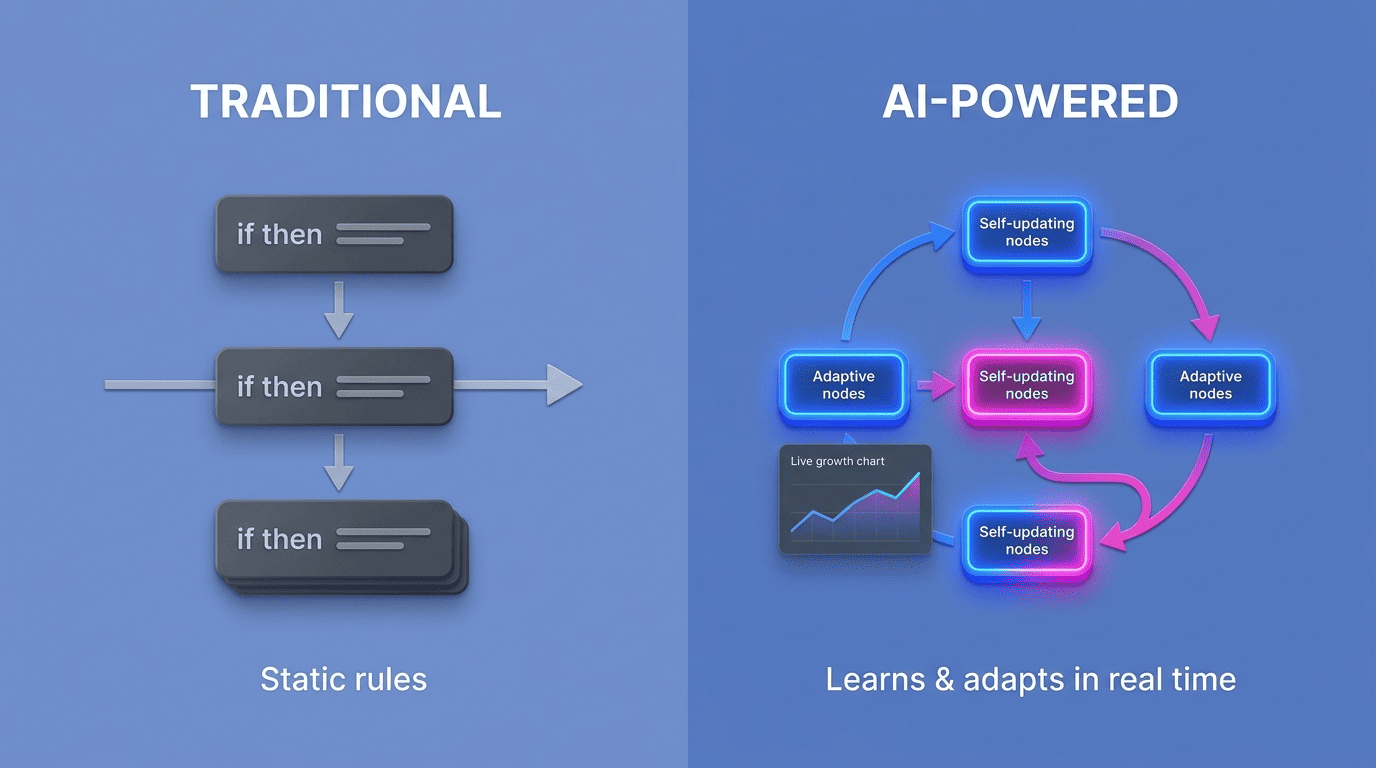
A marketing automation workflow is an automated chain of triggers, conditions, and actions that AI makes adaptive — it decides who gets what, on which channel, and when, based on live behavior instead of fixed rules. That is the core promise of AI marketing automation: traditional automation follows the static rules a marketer set months ago, while AI-powered automation learns from behavioral data and adjusts campaigns in real time, according to a workflow breakdown published by MarTech.
Below is how a workflow is actually built, where AI plugs into each node, five real examples with results, and a step-by-step recipe you can run this week.

What Is an AI Marketing Automation Workflow?
A marketing automation workflow is a series of automated actions triggered by customer behavior or predefined conditions. When a customer does something — opens an email, abandons a cart, fills out a form — that trigger fires, the workflow checks its conditions, and it executes a response, called an action, on a set timing. Among all the tasks marketers automate, email remains the most common: roughly 65% of teams run email sequences as their primary automated workflow.
What separates an intelligent workflow from a static one is the layer of decision-making sitting on top of it. Classic automation executes pre-built sequences on fixed triggers — the same email, the same delay, the same audience, every time. An agentic marketing workflow instead analyzes behavioral patterns across the whole customer base and adjusts campaigns in real time, optimizing toward whatever is actually converting rather than what a rulebook predicted six months ago. Teams that hand this optimization work to AI agents report getting back roughly 8 to 10 hours per week that used to go into manual campaign tweaks.
Traditional vs AI-Powered Automation: What Actually Changes
The practical difference between the two models comes down to who — or what — is making the decisions inside the workflow, and how fast those decisions update.
| Dimension | Traditional automation | AI-powered automation |
|---|---|---|
| Trigger logic | Static if-then rules set by a marketer | Dynamic, learns from behavioral patterns |
| Segmentation | Fixed groups (location, demographics) | Segments that update themselves continuously |
| Personalization | Same message to entire segment | Content and offer tailored per customer |
| Send timing | Fixed delay or schedule | Predictive, tuned to each recipient |
| Campaign creation speed | Manual build, days to weeks | Up to 75% faster with generative assistance |
| Revenue impact | Baseline | 10-30% lift in marketing ROI from hyper-personalization |
An AI-driven marketing automation platform replaces manual if-then branches with dynamic segments, predicted channel and send-time, and content personalized per contact rather than per group. The revenue case for making that switch is measurable: hyper-personalization delivers a 5% to 15% revenue lift and a 10% to 30% lift in marketing ROI, according to McKinsey, and campaign creation runs dramatically faster once generative tools are wired into the workflow.
Adoption still outpaces mastery, though. Most CMOs are already experimenting with agentic AI in some form, but only a small minority — BCG puts it at around 8% — run campaigns where multiple AI agents operate fully autonomously, and the gap almost never comes down to weak AI. It comes down to messy customer data and workflows launched without guardrails.
The Anatomy of a Workflow: Triggers, Conditions, Actions, Timing
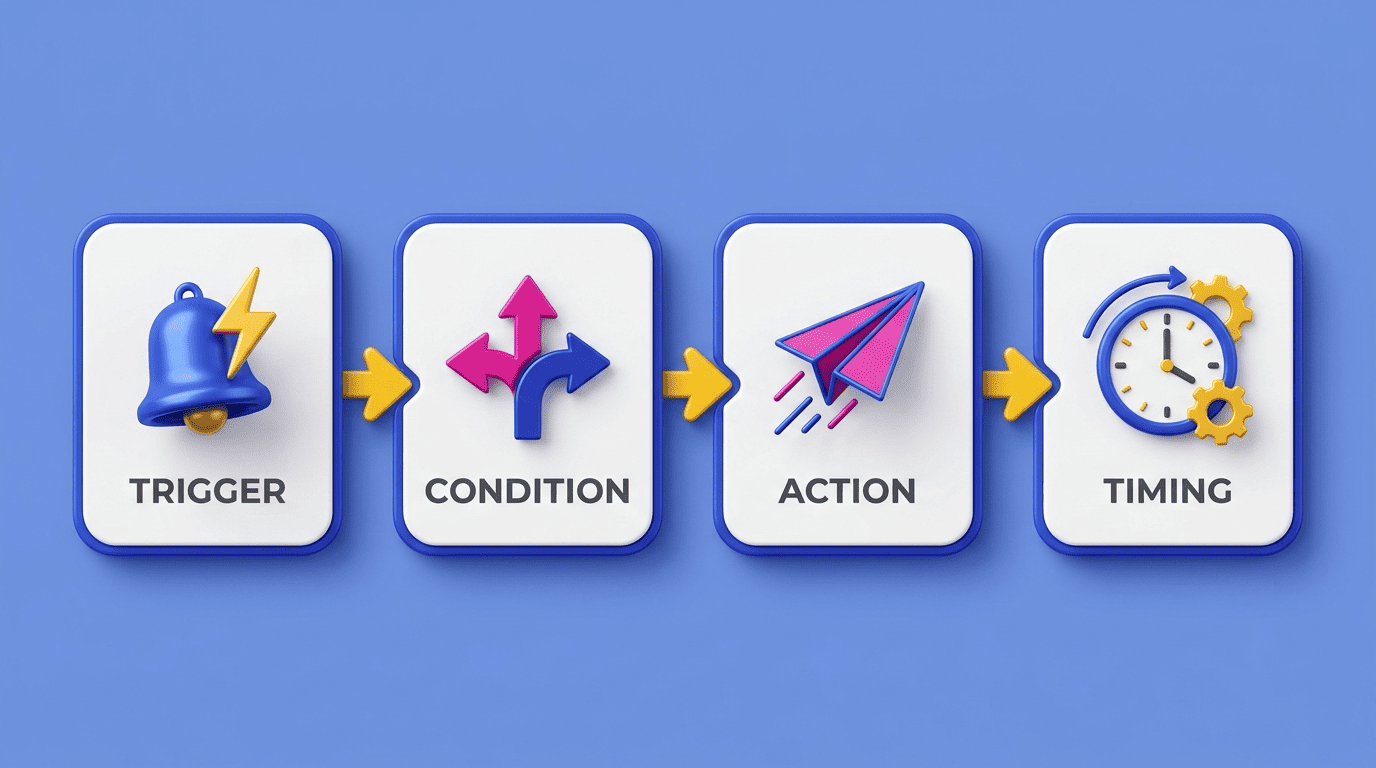
Every marketing automation workflow, AI-driven or not, is built from the same four components. Understanding each one is what makes a workflow diagram readable instead of a black box.
Triggers: event-based and time-based
A trigger is the event that starts the workflow. Common triggers fall into two buckets:
- Event-based: a form gets submitted, a product lands in a cart, a link gets clicked
- Time-based: a fixed number of days after signup, or a specific calendar date
Either way, the trigger is the entry point; nothing in the workflow runs until it fires.
Conditions, actions, and timing
Once a trigger fires, conditions decide which branch a contact travels down — did they open the previous email or not, are they in segment A or B. Actions are what actually happens on each branch: send an email or SMS, update a segment, notify a sales rep, add points to a lead score. Timing governs the delays and send windows between each step, controlling how much breathing room sits between one action and the next. Put together, these four pieces — triggers, conditions, actions, timing — are the complete anatomy of a workflow, whether it is built by hand or optimized by AI.
Where AI Plugs Into the Workflow
AI does not replace the trigger-condition-action-timing structure above — it sits on top of it, deciding what each node should do based on live data rather than a fixed rule.
Dynamic segmentation and predictive lead scoring. Instead of a marketer manually defining segments, AI builds groups that update themselves as behavior changes, and it scores leads by estimating conversion probability against patterns learned from thousands of past converted users, often refreshing the score within a day of a new signal. Predictive lead scoring surfaces the hottest leads automatically, without anyone writing a manual scoring rule.
Personalization, send-time prediction, and generation. AI tailors the subject line, body copy, and call-to-action to where a contact sits in the funnel, and predictive send-time scheduling can lift click-through rate by up to 17%. Generative agents can assemble an entire campaign from a prompt, cutting time-to-market by as much as 75% compared with a manually built sequence. Marketing research on agentic workflows describes several recurring agent archetypes doing this work: content generator, knowledge agent, localization agent, analyst, planner, and operator.
Cross-channel orchestration ties all of this together — the same trigger can branch into email, SMS, and an in-app message, with AI deciding which channel a given contact is most likely to respond on rather than blasting all three at once. The nodes where AI typically gets involved break down into a short list:
- Dynamic segmentation that updates without manual rebuilding
- Predictive lead scoring based on similar past users
- Personalized subject lines, copy, and calls-to-action
- Predictive send-time selection per recipient
- Channel selection for cross-channel orchestration
AI Marketing Automation Workflow Examples
Five workflow patterns show up across nearly every AI-powered marketing stack, and each one has documented results behind it.
Welcome and lead-nurturing sequences
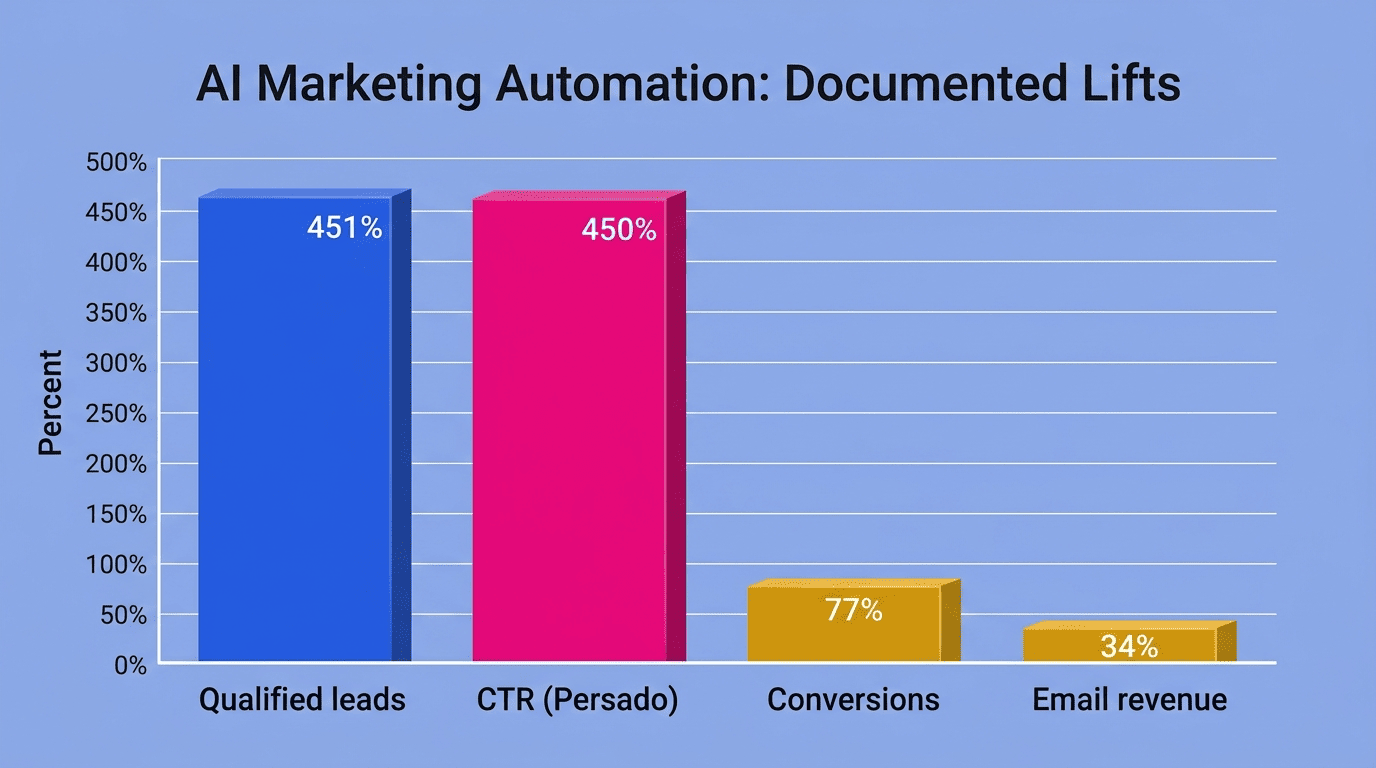
The trigger here is a subscription or a content download. AI adjusts the content and the pacing of follow-up messages based on how engaged a contact turns out to be, rather than sending the same fixed sequence to everyone. Nurture automation built this way has produced a 451% increase in qualified leads and a 77% increase in conversions for teams that adopted it.
Abandoned cart and win-back sequences
Cart abandonment averages 70.19% across e-commerce, and it climbs above 80% on mobile. An AI-powered cart workflow brings shoppers back with personalized reminders instead of a single generic follow-up, while a separate win-back sequence targets customers who have gone quiet for 90 to 180 days. Two documented results stand out: retailer Sideshow went from campaign idea to live send in under 15 minutes and generated $10,000 from a single automated campaign, and Hornby Hobbies cut analysis time by 70% while growing email-driven revenue by 34%.
Lead scoring and re-engagement
A scoring workflow flags hot leads automatically and routes them straight to a sales rep instead of sitting in a shared inbox. AI-generated ad copy from Persado’s language-optimization platform lifted click-through rate by up to 450% for JPMorgan Chase compared with human-written copy, illustrating how much of the lift can come from the content layer, not just the targeting logic.
How to Build an AI Marketing Automation Workflow (Step by Step)
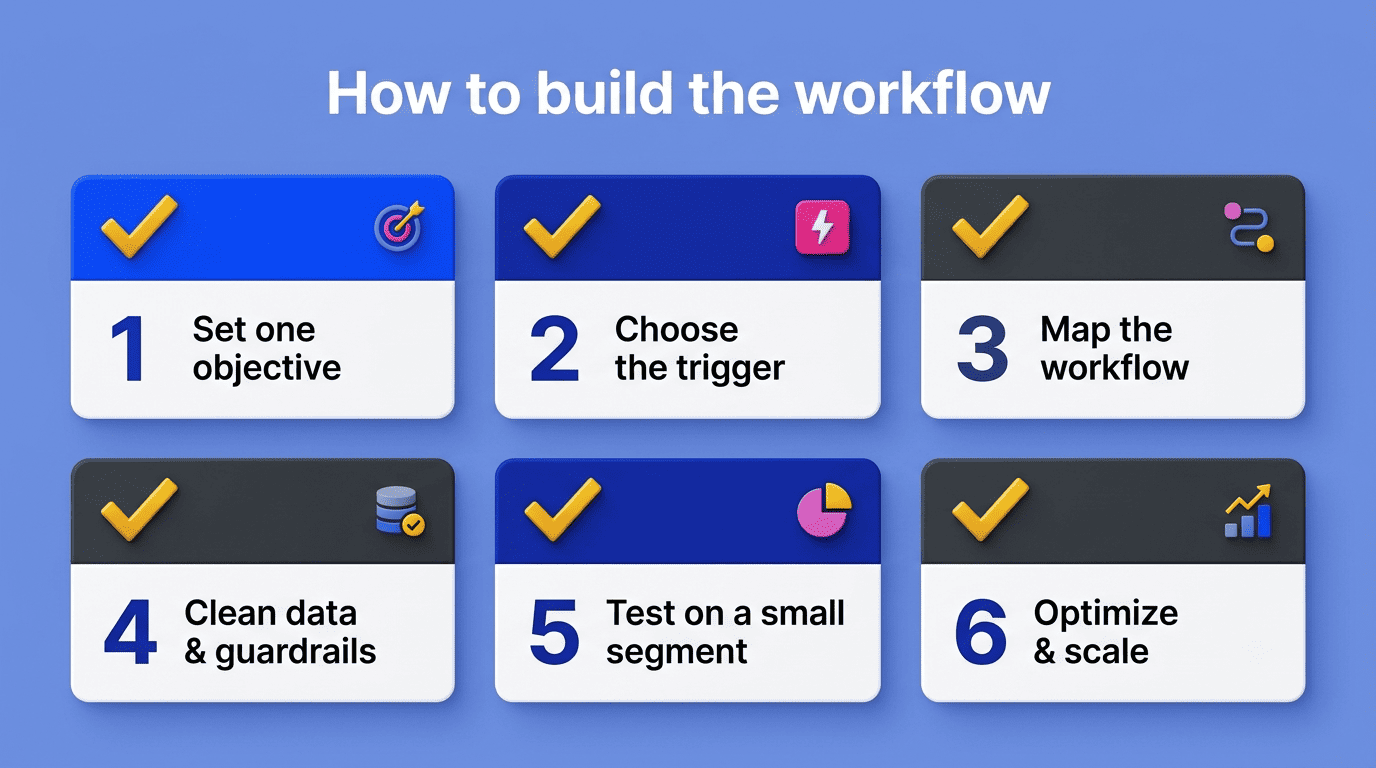
- Set one measurable objective — «raise repeat purchase rate,» not the vague goal of «send more email.» A workflow with two objectives is really two workflows fighting each other.
- Choose the trigger event that should start the sequence, whether it is behavioral (cart abandoned) or time-based (30 days since last purchase).
- Map the workflow before opening any builder — sketch every branching point and the outcome you want at each one.
- Clean the underlying customer data, since the AI layer learns directly from it, and set guardrails so campaigns stay relevant and human, not just optimized.
- Launch on a small segment first and verify every branch behaves as mapped before it touches the full list.
- Let AI optimize send-time and content once the workflow is stable, then scale — large marketing teams routinely run 50 to 100 automated campaigns in parallel once this loop is trusted.
That sequence works whether the workflow is a single abandoned-cart reminder or a full cross-channel orchestration spanning email, SMS, and in-app messaging.
Tools and Platforms
The right tool depends less on brand and more on where a company’s customer data already lives, but most stacks draw from four categories.
| Category | Examples | What it does |
|---|---|---|
| Workflow orchestrators | Zapier, Make, n8n | Connect apps and route triggers; platforms in this category ship with 1,000+ integrations |
| All-in-one automation/CRM | HubSpot, Salesforce, ActiveCampaign, Bloomreach | House the workflow builder, segmentation, and campaign sends in one system |
| Generative models | ChatGPT, Claude, Gemini | Draft and personalize copy; increasingly model-agnostic through the Model Context Protocol |
| Data and analytics | Data platforms pulling from 500+ marketing sources | Feed clean, unified customer data into the workflow so AI has something accurate to learn from |
Zapier, Make, and n8n sit at the orchestration layer and connect the CRM, the ad platforms, and the generative model into one working pipeline — this is usually where an AI marketing automation platform starts to take shape technically, even before a single workflow is drawn.
Data, Guardrails, and Compliance
Clean data and a human in the loop
An AI system is only as good as the data it learns from — dirty contact records, duplicate profiles, and stale behavioral signals produce workflows that mistarget customers no matter how sophisticated the model is. Human-in-the-loop review matters most on sensitive decisions, like discount eligibility or anything customer-facing that could misfire publicly. The core risks to watch for come down to three things:
- Bias baked into training data that skews who a workflow targets
- Outright hallucinated content in generated copy or offers
- Privacy violations from data the workflow was never authorized to use
Compliance is not optional
Every automated workflow that touches email or SMS has to comply with GDPR, CCPA, and CAN-SPAM — consent before sending, a working opt-out, and transparency about what data is collected and why.
Your message must include a clear and conspicuous explanation of how the recipient can opt out of getting marketing email from you in the future.
Federal Trade Commission, CAN-SPAM Compliance Guide
GDPR Regulation (EU) 2016/679 sets the equivalent bar for any workflow touching EU residents’ data — consent has to be specific, informed, and as easy to withdraw as it was to give. None of this is a launch nice-to-have; it is a condition of launching at all.
Measuring Results and ROI
The workflow metrics worth tracking are narrower than most dashboards suggest: conversion rate per branch, time-to-conversion, revenue per workflow, and hours of manual work saved. Companies report strong outcomes once these are tracked consistently — 76% see a positive ROI from marketing automation within a year of adoption, and generative AI specifically adds 5% to 15% in productivity relative to the marketing budget spent. Combined with the 8 to 10 hours per week teams recover from handing optimization to AI agents, the case for measuring a workflow by branch rather than by campaign becomes obvious — it is the only way to see which node is actually earning its keep.